Signals for FireHydrant
Alerting and on-call, rethought as part of incident management
Signals is FireHydrant's alerting and on-call product, designed to help teams respond faster and more consistently by tightly integrating alerts into the incident lifecycle—from first notification to resolution and retro.
The Problem
Most alerting tools are built as standalone systems. They notify people, but they don't help teams understand what's happening, coordinate a response, or transition cleanly into incident management.
As a result:
- •Alerts lack context
- •On-call engineers spend time triaging instead of responding
- •Incidents fracture across tools
- •Escalation rules are powerful but hard to reason about
We saw an opportunity to design alerting not as a separate product, but as the first step in incident response.
Designing for the full incident lifecycle
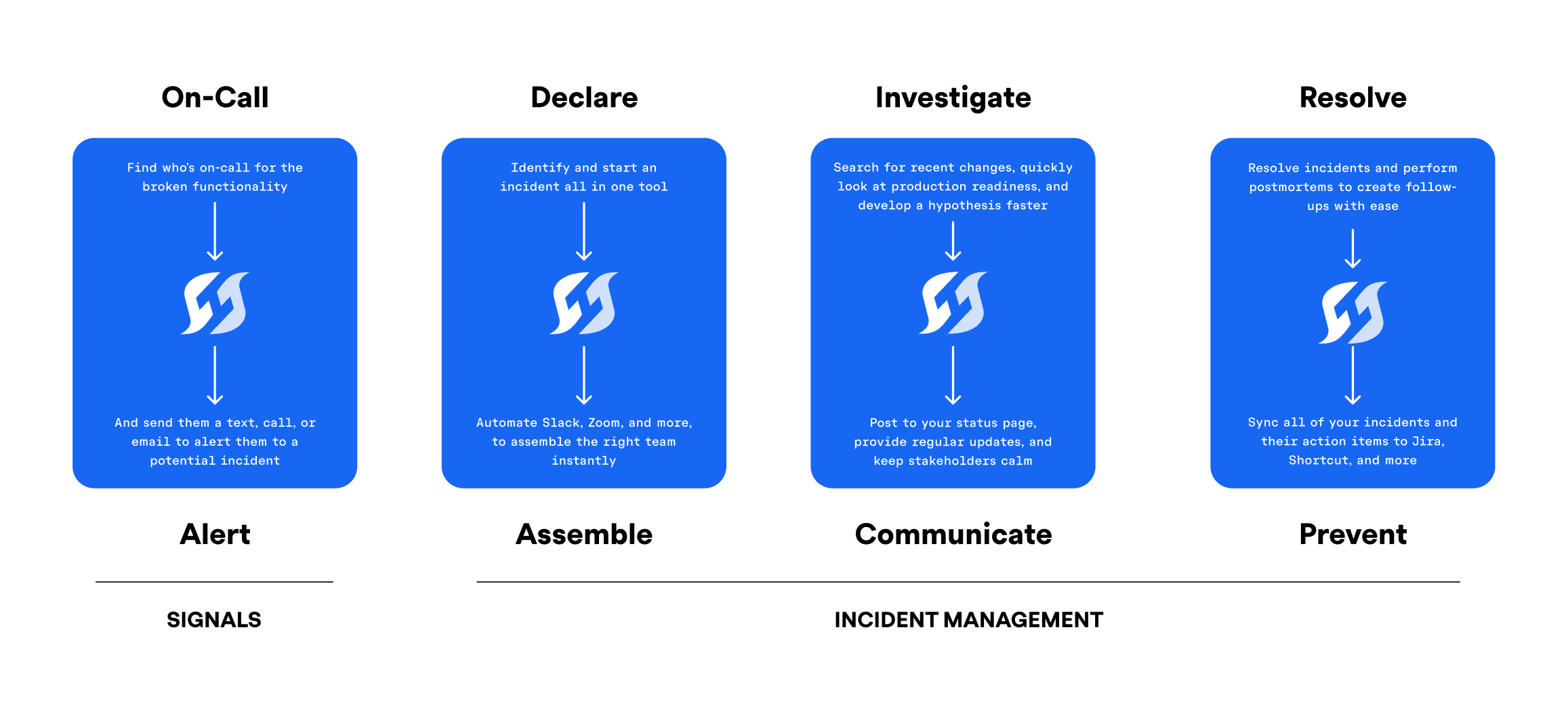
The core design principle was end-to-end continuity: alerts shouldn't end at notification—they should flow naturally into investigation, resolution, and learning.
Internally, we described this as designing "from ring to retro."
Signals was built to:
- •Trigger alerts with clear ownership
- •Escalate predictably over time
- •Transition smoothly into incidents
- •Preserve context for post-incident review
Key system decisions
Decoupling alerts from incidents
Alerts and incidents serve different purposes. Alerts demand immediate attention; incidents represent coordinated response. Tying them too tightly increases noise and cost.
We designed alerts to optionally connect to incidents, rather than forcing a one-to-one relationship. This reduced unnecessary incidents while preserving escalation and auditability.
Treating escalation as a time-based system
Escalation policies aren't just lists of people — they're timelines. We treated time as a first-class concept, making it explicit when actions happen and why.
Optimizing for predictability over raw flexibility
Existing tools optimize for configurability. We optimized for understandability, even when that meant constraining options.
Deep dive: Escalation policies
Escalation policies were the most complex and highest-risk part of Signals. They combine time, ownership, repetition, and hand-offs—and small misunderstandings have real operational impact.
Alpha: exposing everything
Our initial assumption was that experienced engineers could handle the full complexity. Policies were fully visible and configurable, but users struggled to understand:
- •Time gaps between notifications
- •When repetition started
- •When responsibility changed hands
Beta: making time explicit
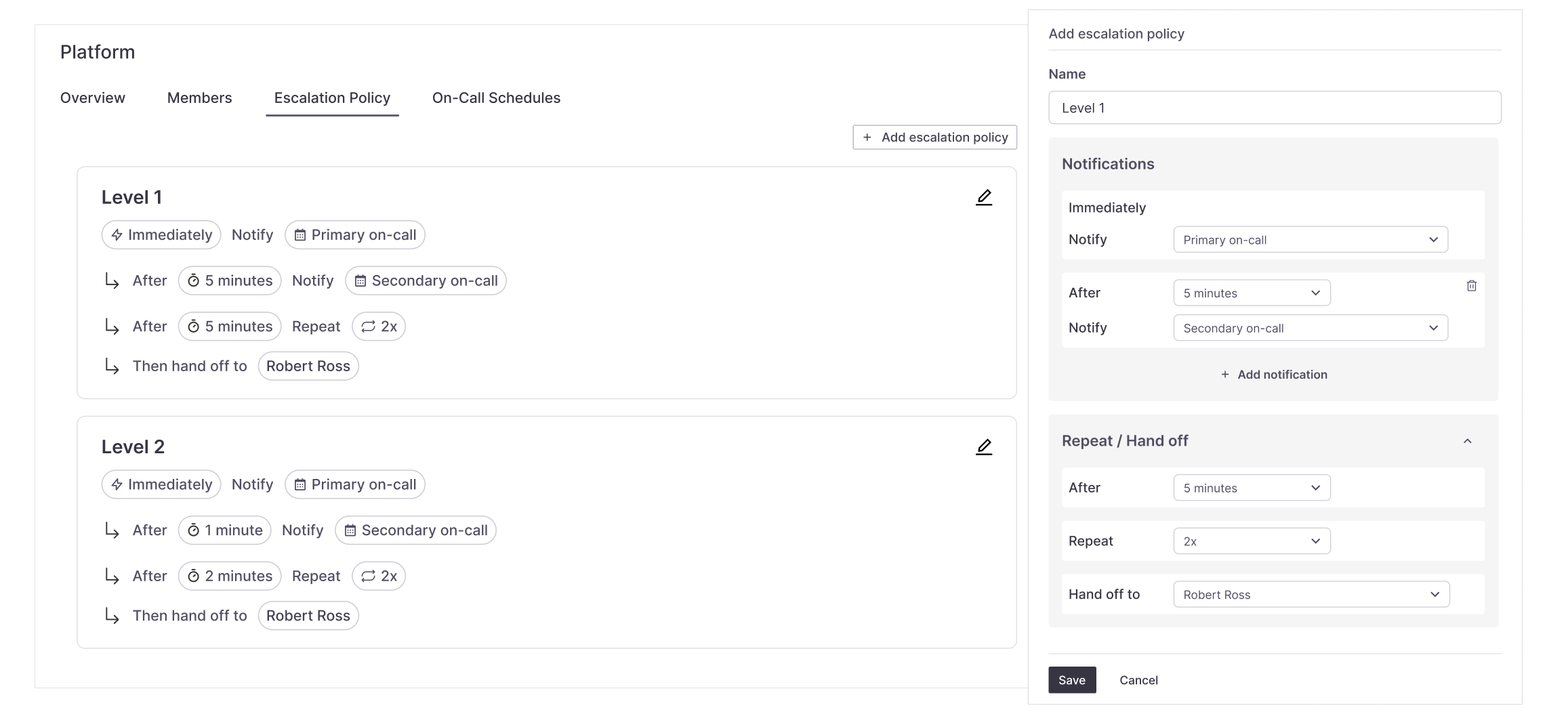
User feedback showed that time was the missing dimension. We redesigned escalation policies to visualize actions along a timeline, clarifying order, delays, repeats, and hand-offs.
GA: clarity over cleverness
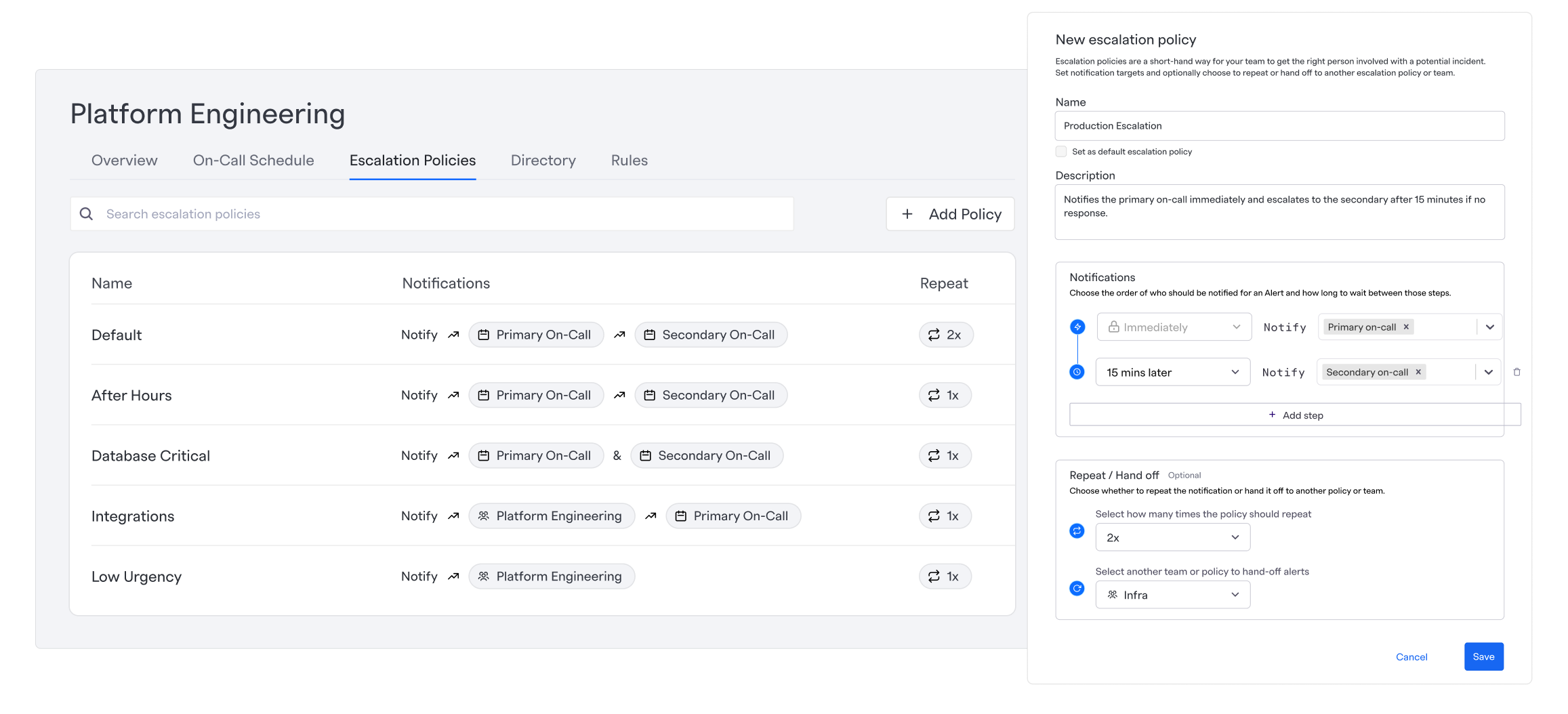
Final designs prioritized:
- •Clear language
- •Explicit intervals
- •Scan-friendly policy summaries
- •Helper text that explained why, not just what
The result was a system that felt powerful without being opaque.
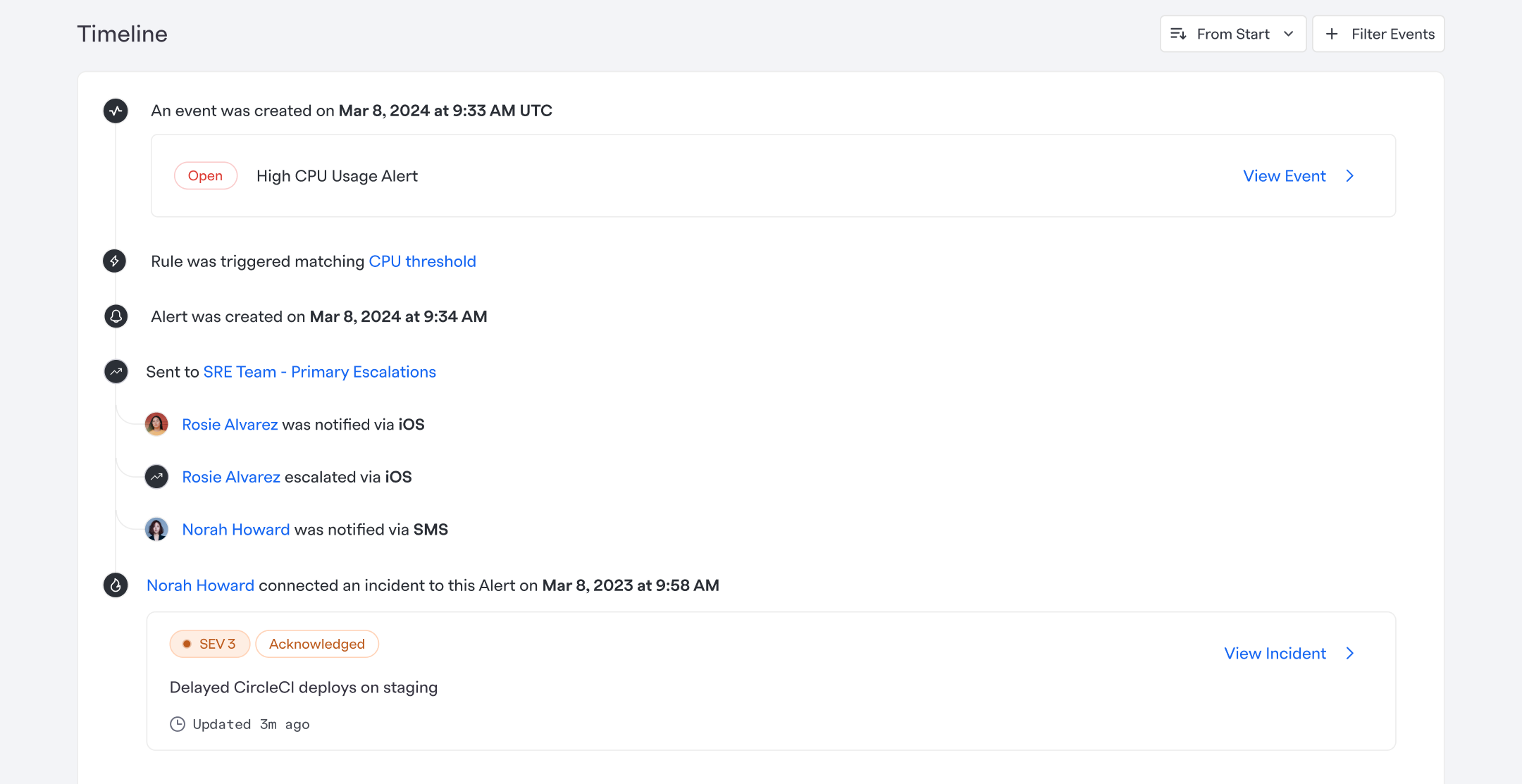
Visualizing alert context in real time
Even with better configuration, users still needed to understand what was happening during an alert.
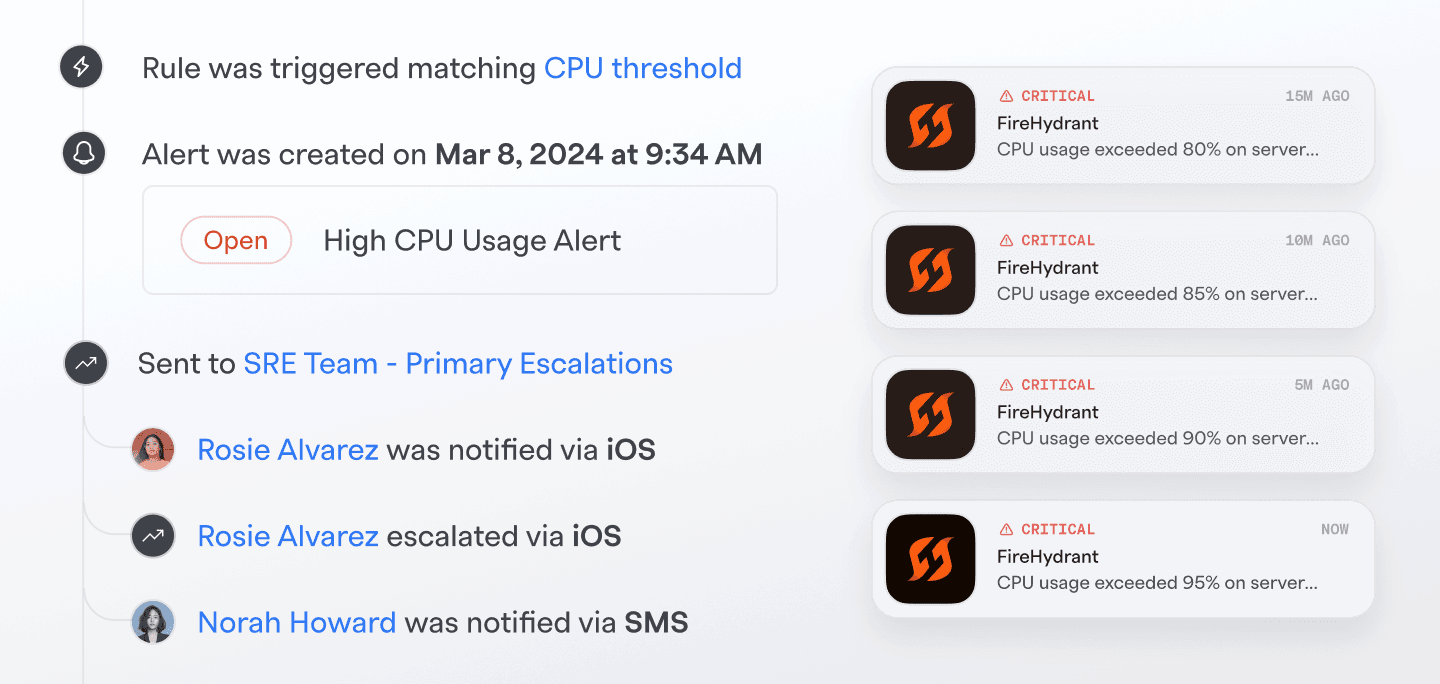
We introduced an alert timeline that shows:
- •When the signal triggered
- •Who was notified and how
- •Status changes over time
- •When alerts connected to incidents
This reduced guesswork and improved confidence during high-stress moments.
Impact
- Revenue:$250k ARR closed during beta
- Adoption:Strong uptake from existing customers
- Market response:Major competitors launched similar offerings shortly after GA
- Customer feedback:Consistently highlighted clarity, cost savings, and ease of adoption
Reflection
Designing Signals reinforced the importance of seeing the entire system, not just individual features. The most meaningful improvements came from understanding where users lost confidence—and reshaping the product to restore it.
At this scale, good design isn't about adding capability. It's about making complex systems feel trustworthy under pressure.